Native App vs Mobile Web App: Which Should You Build?

Archie Norman
Choosing between a native app and a mobile web app can sound like a technical decision. In practice, it’s a product decision: how do your users want to access the service, what does the app actually need to do, and how much complexity is worth taking on?
For many businesses, a mobile-first web app is the better place to start. The biggest reason is often cost. A standard web app is usually quicker and cheaper to build because you’re creating one application that works across phones, tablets and desktops, rather than investing in separate native apps or the additional functionality required for a PWA.
That lower initial cost also makes a web app a practical way to launch, learn what users actually need and invest more once there’s evidence that features such as installation, offline access or push notifications will add value.
Native apps still have an important role. If your product depends heavily on device hardware, complex background processing or very demanding graphics, native development may be the stronger choice.
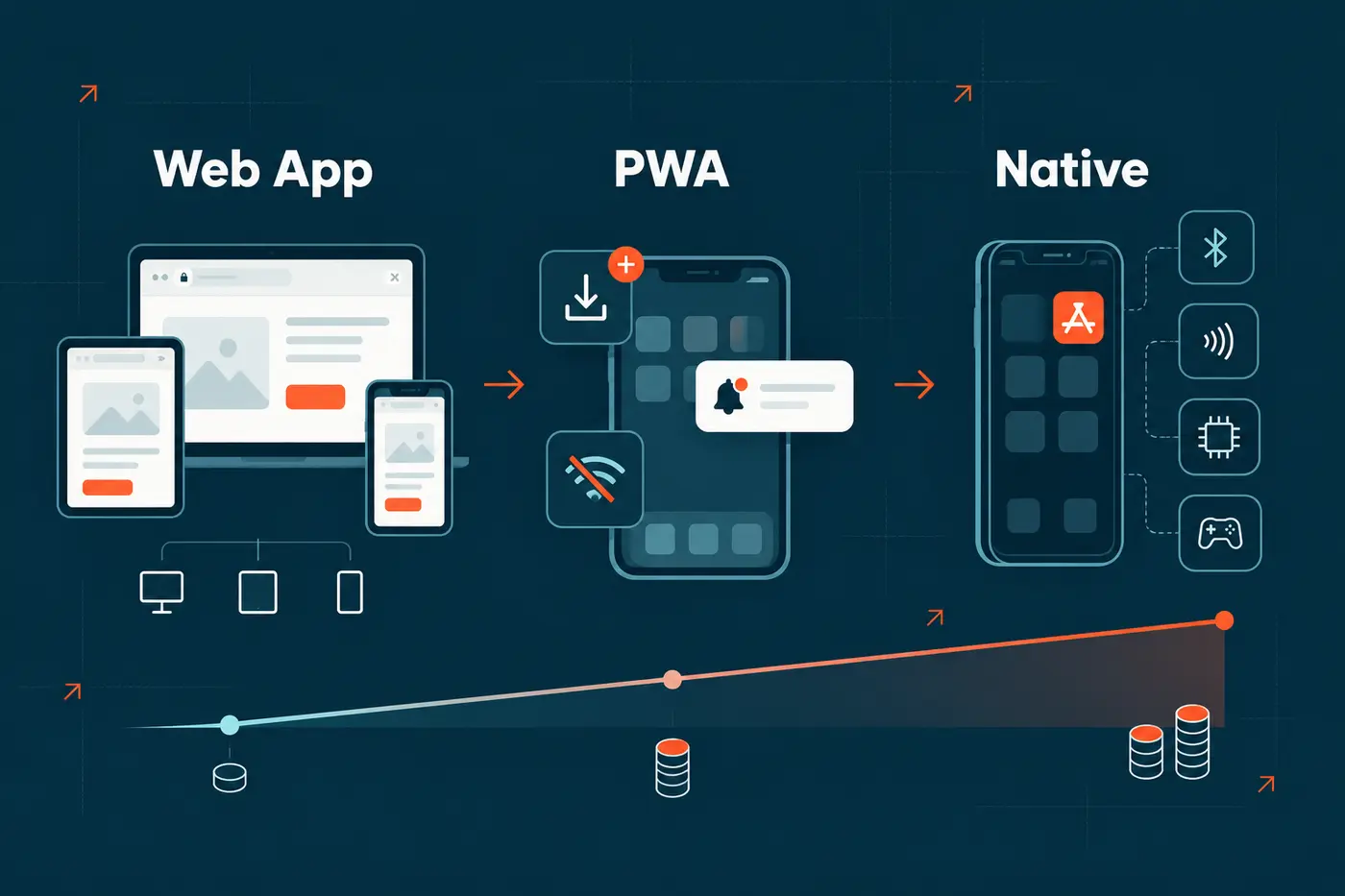
There’s also a useful middle ground: Progressive Web Apps (PWAs) can give a web application features such as installation, offline behaviour and push notifications without giving up the reach of the web.
Native app vs mobile web app: the short answer 📱
If you’re building a customer portal, SaaS product, booking system, marketplace, internal tool or another typical business application, we’d generally start by exploring a mobile web app.
- Choose a mobile web app when keeping development costs down, reaching users across devices and launching quickly matter most.
- Choose a Progressive Web App when you want an app-like mobile experience, including installation, offline support or push notifications, without taking on the cost and complexity of separate native apps.
- Choose native when deep integration with the phone itself is central to the product and justifies the additional development and maintenance cost.
The key is not to build a native app simply because your users will access the product on a phone. A good mobile web app should be designed specifically for touch screens and smaller displays rather than being a desktop product squeezed onto a mobile.
What is a mobile web app? 🌐
A mobile web app is an application accessed through a browser, usually from a normal URL. Unlike a simple marketing website, it might contain user accounts, dashboards, payments, messaging, booking flows, reports, forms or complex business workflows.
Responsive design allows the same application to adapt to different screen sizes. That means someone could start a task from their laptop at work and continue from their phone later without needing a completely separate product.
Google also uses the mobile version of a site's content for indexing and ranking, making a strong mobile experience important for products that depend on search visibility. Google recommends mobile-friendly websites and responsive design for exactly this reason.
For a business, the important bit is that there’s one application at the centre of the experience rather than separate products that need to evolve independently.
What is a native mobile app? 📲
A native app is built for a particular mobile platform and installed on the device, typically through Apple's App Store or Google Play.
Native development gives developers closer access to the operating system and device hardware. It can be a great fit for products where things such as Bluetooth communication, NFC, intensive graphics or sophisticated background activity are fundamental to the experience.
The trade-off is additional complexity. Supporting iOS and Android may mean maintaining different platform-specific code or introducing a cross-platform native framework. Releases and updates also have to fit the distribution processes of the relevant app stores. Apple reviews app versions and updates submitted to the App Store, while Google Play similarly operates a review and release process.
What is a Progressive Web App ⚡
One thing that has changed significantly since the early days of mobile apps is what browsers can do.
A Progressive Web App is still a web application, but it uses browser technologies to provide more app-like behaviour. Depending on the device and browser, a PWA can be installed on a home screen, launch in its own window, work offline and respond to push notifications.
MDN describes PWAs as web applications that can combine the reach of the web with features normally associated with installed software.
Support on Apple devices has improved too. Since iOS and iPadOS 16.4, web apps added to the Home Screen can receive standards-based Web Push notifications, including notifications on the Lock Screen and in Notification Centre.
A PWA isn't the same thing as a hybrid app. A hybrid app normally packages web technologies inside a native application wrapper for distribution through an app store. A PWA remains part of the open web.
When a Progressive Web App is the best choice ✨
For many mobile-first products, a PWA gives you the most useful balance between a standard web app and a native app. You keep the reach and flexibility of the web, while adding the app-like features that users actually need.
At mmtm, a PWA is often the approach we recommend when a product will be used heavily on mobile but doesn't require the deeper operating-system access that justifies native development.
A PWA is particularly worth considering when:
- Users would benefit from adding the product to their home screen.
- Push notifications are an important part of the experience.
- Some functionality needs to remain available with a poor or interrupted internet connection.
- You want an app-like, full-screen mobile experience without maintaining separate iOS and Android applications.
- The product also needs to remain accessible through a URL on desktop and mobile.
- You expect to release improvements regularly and want users to receive them without downloading app-store updates.
There is additional development work compared with a standard responsive web app. Offline behaviour, caching, notifications and differences between browsers all need to be designed and tested properly. But for many products, that investment is easier to justify than the significantly broader development and maintenance commitment of going fully native.
The important question is whether those PWA features solve a real user need. If users don't need installation, notifications or offline functionality, a well-designed mobile web app may still be the simpler and more cost-effective choice.
When a mobile web app is often the better starting point 🚀
It usually costs less to build
For many businesses, this is the most important advantage. A mobile web app gives you one application to design, build and test across mobile and desktop, which generally means less development work than creating native apps for multiple platforms.
A PWA also starts with the web, but features such as installation, offline behaviour, caching and push notifications add development and testing work. Native apps usually introduce more complexity again because you need to account for the requirements of iOS and Android, app-store distribution and platform-specific behaviour.
That doesn’t mean the cheapest option is automatically the right one. It means you should only pay for the additional complexity when the product and its users will genuinely benefit from it.
Users can get started without installing anything
Every extra step between discovering a product and using it creates friction.
With a web app, someone can tap a link from Google, an email, a QR code or a message and go directly to the relevant screen. They don't need to visit an app store, wait for a download and then find their way back to the task they originally wanted to complete.
That’s particularly useful for products people use occasionally: event platforms, booking systems, customer portals, compliance tools or services where forcing someone to install an app may be difficult to justify.
You can support mobile and desktop with the same product
Plenty of business applications aren't genuinely mobile-only.
A manager may want a full dashboard on a laptop while someone in the field needs a streamlined mobile workflow. A customer might register on their phone but return later from a desktop computer.
A responsive web application can support those different contexts from the same underlying system.
Updates are easier to put in users' hands
When a web application is updated, users receive the new version the next time they load it. There isn't a separate app-store release for every product improvement.
That can be especially valuable early in a product's life, when feedback is arriving quickly and you're still learning which features deserve more investment.
Our approach to creating new digital products is deliberately built around discovery, focused first releases and continued improvement rather than trying to predict every requirement before launch.
The web is naturally shareable and discoverable
Individual screens within a web application can have URLs. That makes it much easier to send someone directly to useful content or allow public pages to appear in search results.
Native apps can of course be discovered through app stores, but the open web gives you a much broader set of ways to attract and direct users.
You have one main application to look after
Every additional platform adds development, testing and maintenance work.
A mobile-first web application lets you focus that effort on one core product across devices. It doesn't make development free or simple, but it can avoid taking on multiple application codebases before the business has proved that it needs them.
Modern web apps can do more than many teams realise 🧩
The old assumption that websites can only display information while native apps get all the interesting features is increasingly outdated.
Web applications can already use capabilities such as geolocation, notifications, offline storage and home-screen installation. Some browser APIs can go considerably further.
There are still limits, though. Support for technologies such as Web Bluetooth and Web NFC isn't consistent across all major browsers. Some background-processing features also vary by platform.
That means you shouldn't choose a platform based on a generic feature checklist. You need to check the particular capabilities your product depends on against the devices and browsers your real users have.
When a native app is worth the extra complexity ⚙️
There are situations where we'd be much more likely to recommend native development.
If the core product needs continuous or unusually deep access to phone hardware, native may give you a more dependable foundation. The same applies to products where sustained background activity, specialised Bluetooth or NFC integrations, advanced media processing, high-performance graphics or tight operating-system integration make up an important part of the experience.
Native can also make sense when the app itself is something users are expected to install and engage with frequently, and App Store or Google Play distribution is an important part of the commercial model.
The distinction is important: native should solve a product requirement, not simply tick a box marked "we need an app".
Questions to answer before choosing your app technology 🤔
Before deciding, look at how people will genuinely use the product.
How will users first find it? If discovery happens through Google, email, marketing campaigns or shared links, the web has a natural advantage.
Do people need desktop access too? If they do, a responsive web application can give you one coherent product across devices.
Which phone features are essential? Be specific. "We might use the camera one day" isn't a strong reason to choose native. A product that depends on a specialist Bluetooth device every few minutes is a very different proposition.
How important is offline use? A PWA can support useful offline experiences, but a product designed to run for long periods with no connectivity may justify a native approach.
How often will the product change? If you're validating a new idea, being able to launch and iterate quickly can be more valuable than optimising for every possible native capability on day one.
Are users actually asking for an installed app? Look at analytics, speak to customers and understand the problem behind the request. Sometimes "we need an app" really means "your current mobile experience is frustrating".
This is exactly the sort of question worth exploring during product discovery, before a major technical commitment has been made.
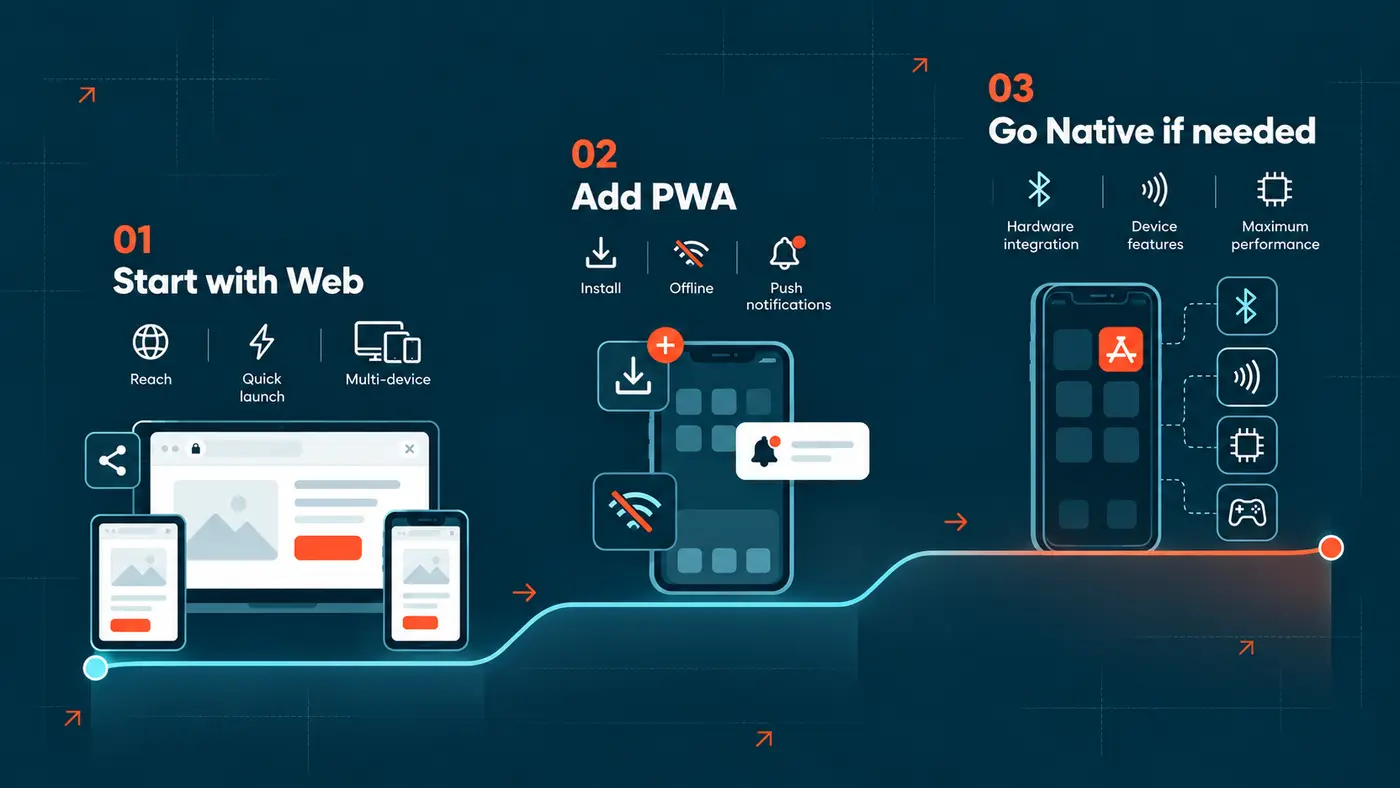
A sensible strategy: start with the web, then choose the right level of app experience 📈
For many founders, SMEs and product teams, we'd start with web technology rather than jumping straight to native development. If the product simply needs to work brilliantly on mobile, that may mean a responsive web app. If installation, notifications, offline behaviour or a more app-like experience are important from the outset, we'd often recommend building it as a PWA.
Both approaches let you maintain one core web application across devices. The difference is how much additional mobile functionality is worth investing in at that stage of the product.
If usage later shows that a dedicated native experience would deliver enough additional value, you can assess it with much better evidence. You'll already understand the user journeys, data model, integrations and features that matter.
At mmtm, we build responsive Ruby on Rails applications using HTML, CSS and JavaScript at the core, adding tools such as Hotwire, React or Vue where richer front-end behaviour is useful. You can read more about how we build scalable web apps and the technology behind them.
The aim isn't to avoid native development. Rather to invest in the right level of complexity: a mobile web app when simplicity and cost matter most, a PWA when an app-like experience adds real value, and native development when the product genuinely depends on capabilities the web can't provide.

Martin Dick
Co-Founder, mmtm
Not sure if you really need a native app?
We help founders and product teams work out what their product actually needs before committing to a platform. Often, the best answer is a mobile-first web app that reaches users quickly and keeps the product easier to evolve.
If your idea genuinely needs native capabilities, we'll tell you that too. The useful decision is the one backed by real user needs, technical constraints and a clear route to launch.
Talk through your app ideaFrequently Asked Questions
What is the difference between a mobile web app and a native app?
A mobile web app runs through a browser and can work across multiple devices from the same application. A native app is installed on a particular operating system, such as iOS or Android, and generally has deeper access to that platform's capabilities.
Is a mobile web app just a responsive website?
Not necessarily. Responsive design is the technique used to adapt an interface to different screen sizes. A web app can be a complete software product with logins, workflows, dashboards, payments, integrations and other interactive features while still using responsive design.
Can a web app be installed on a phone?
Yes. Progressive Web Apps can be installed on supported devices and launched from an icon in much the same way as other applications. Installation behaviour varies slightly between browsers and operating systems. MDN explains current PWA installation support.
Can a web app send push notifications on an iPhone?
Yes. Home Screen web apps have supported Web Push on iPhone and iPad since iOS and iPadOS 16.4. Users still need to install the web app to their Home Screen and grant notification permission.
Is a mobile web app cheaper to build than a PWA or native app?
Usually, yes. A standard responsive web app is generally the simplest of the three because you're building one application without the additional offline, installation and notification functionality of a PWA. A PWA requires more development and testing, while native development can involve additional platform-specific work for iOS and Android.
The right comparison depends on the features you need, though. If your users genuinely need an installed, app-like experience, a PWA can offer a more cost-effective route than building and maintaining separate native applications.
Should I build a native app for an MVP?
Only if a native capability is fundamental to proving the idea. For many new products, a mobile-first web app is a simpler way to reach users, gather feedback and improve the product without committing to separate mobile platforms too early. A focused product discovery and build process can help you test that decision before development begins.
Not Sure What To Read Next? Here's What We Recommend...
- App Development
- Web Development
- Product Development
- UX Design
- Digital Solutions